Building an In-App Feedback Loop for Your SwiftUI App
Every iOS team eventually hits the same wall: you have users, they have opinions, and you have no idea what they actually want.
The opinions exist. They're just scattered. A one-star App Store review that says "crashes when I rotate" with no device info and no way to reply. A support email from someone who churned three weeks ago. A TestFlight note that arrives as a screenshot in your inbox. A DM. A Reddit thread you found by accident.
None of these are connected to each other, none of them are countable, and none of them let you tell the person who asked that you shipped the thing they asked for.
That last part is the real cost. Feedback isn't a collection problem. It's a loop problem. And an unclosed loop is why users stop bothering to tell you anything.
Why the default channels fail
It's worth being specific about why App Store reviews, email, and TestFlight are bad feedback infrastructure, because each fails differently.
App Store reviews are write-only and lossy. Users write them at the moment of maximum frustration, with no structured fields. You can respond publicly, but you can't ask a follow-up question. And the review is attached to a version, not to an issue. So the signal decays every release.
Email has no structure and no dedupe. Twenty people asking for dark mode arrive as twenty separate threads. There is no vote count, no way to see that they're the same request, and no way to notify all twenty when it ships. You are the deduplication algorithm, running manually, forever.
TestFlight feedback is invisible to your users. A tester sends a screenshot into App Store Connect and it disappears. They can't see whether anyone read it, whether it's being worked on, or whether someone already reported it. So they report it again. Or they stop.
The common failure is the same in all three: the user gets no visibility into what happens after they speak. That's what an in-app feedback system actually fixes.
What a good in-app feedback flow looks like
Before reaching for any library, it's worth writing down the requirements. A feedback loop that actually changes your roadmap needs five things:
- It's inside the app. The moment a user thinks "this should do X" is the moment you get the request. A mailto: link loses most of them: you're asking someone to context-switch into Mail, compose a message, and describe UI they can no longer see.
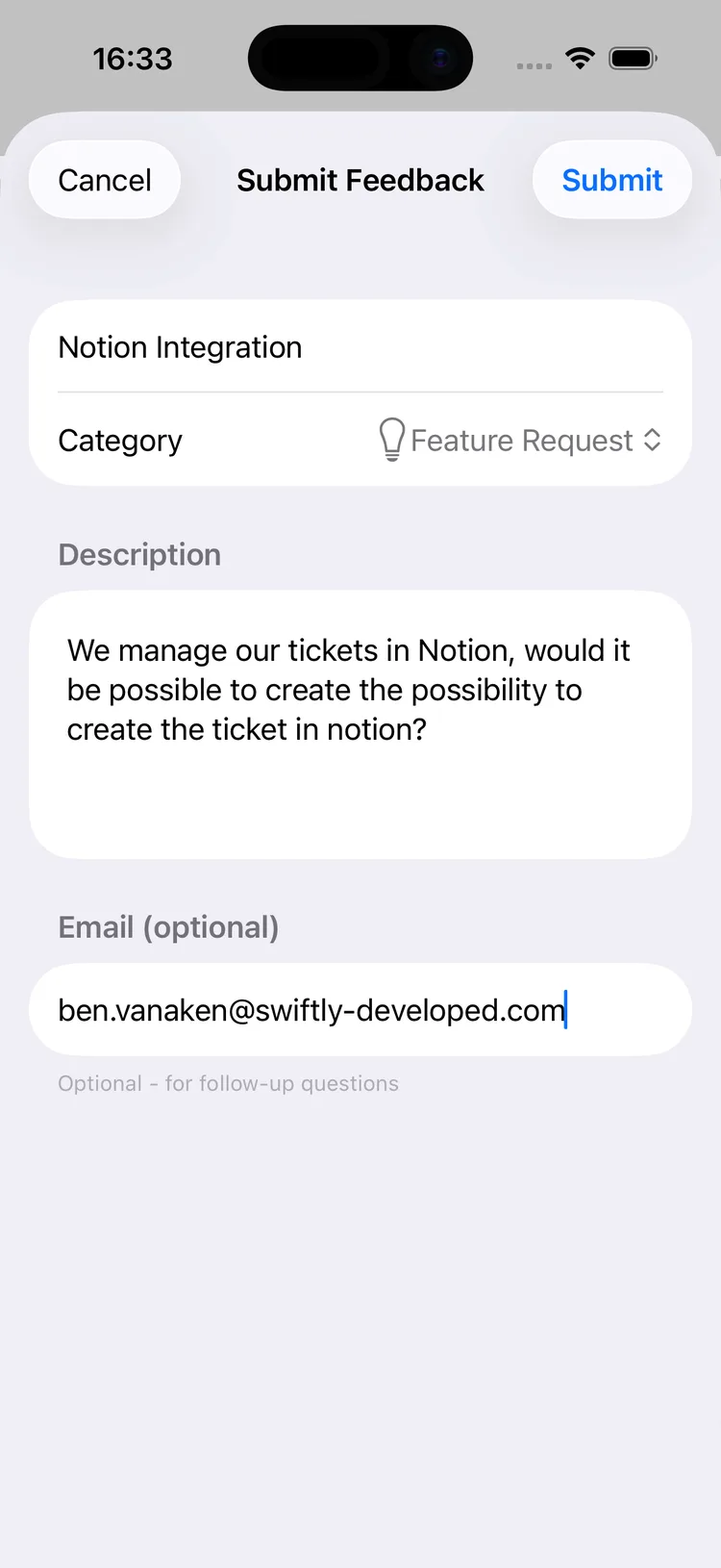
- Submissions are structured. Title, description, and a category (feature request vs. bug vs. improvement) at minimum. Free-text-only means you'll be doing triage by hand.
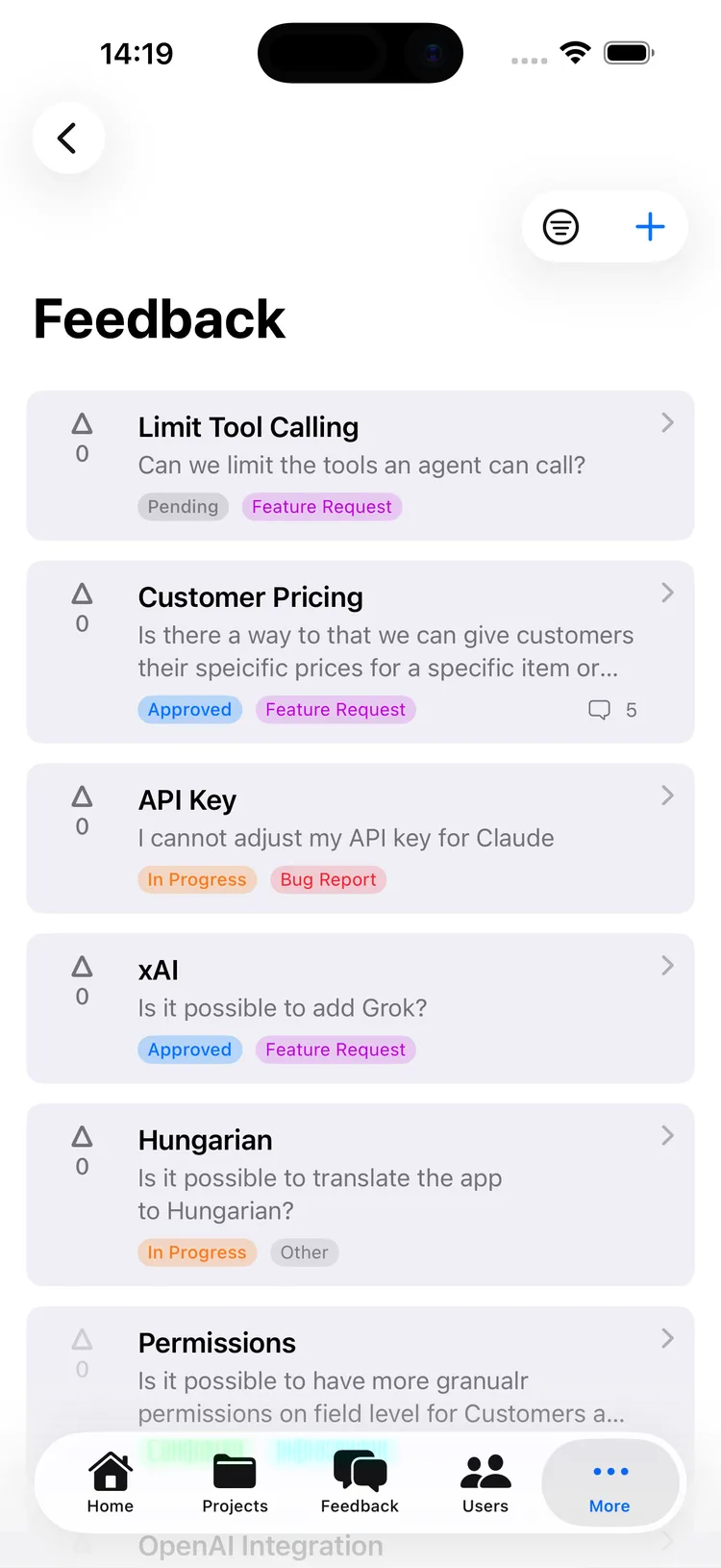
- Existing requests are visible and votable. This is the highest-leverage feature and the one most homegrown solutions skip. If users can see that "iPad support" already exists with 40 votes, they upvote instead of filing duplicate #41. And you get a prioritized backlog for free.
- Status is public. Pending, approved, in progress, TestFlight, completed. Users who can watch their request move keep filing requests.
- The loop closes automatically. When something ships, everyone who voted hears about it. You don't maintain a spreadsheet of who asked for what.
Requirements 1–2 are an afternoon of work. Requirements 3–5 are where the DIY estimate falls apart. Voting needs stable, privacy-respecting user identity. Status changes need an admin surface: you're now building a small CMS. Notifications need an email pipeline, unsubscribe handling, and someone to remember to send them. That's the point where most teams quietly ship a mailto: link instead.
Implementing it
Here's what this looks like concretely. We built FeedbackKit to cover exactly that 3–5 gap: a Swift SDK with drop-in SwiftUI views on the client, and a hosted admin app on the other end where feedback becomes tickets.
Installation is Swift Package Manager, pointed at the SDK repo. Configuration happens once, in your App init, keyed per environment:
import SwiftUI
import SwiftlyFeedbackKit

@main
struct MyApp: App {
    init() {
        #if DEBUG
        SwiftlyFeedback.configure(
            environment: .development,
            key: "sf_your_dev_key"
        )
        #elseif TESTFLIGHT
        SwiftlyFeedback.configure(
            environment: .testflight,
            key: "sf_your_staging_key"
        )
        #else
        SwiftlyFeedback.configure(
            environment: .production,
            key: "sf_your_prod_key"
        )
        #endif

        // Match your app's design
        SwiftlyFeedback.theme.primaryColor = .adaptive(
            light: .blue,
            dark: .cyan
        )
        SwiftlyFeedback.theme.categoryColors
            .bugReport = .red
    }

    var body: some Scene {
        WindowGroup {
            ContentView()
        }
    }
}
The separate-environment keys matter more than they look. If your TestFlight builds and your App Store builds write into the same feedback bucket, your beta testers' rough-edge reports get mixed in with real user requests, and your prioritization signal goes to noise. (TESTFLIGHT is a custom compilation condition you add under Active Compilation Conditions for that build configuration.)
Presenting the UI is then a sheet:
struct SettingsView: View {
    @State private var showFeedback = false

    var body: some View {
        Button("Feedback & Feature Requests") {
            showFeedback = true
        }
        .sheet(isPresented: $showFeedback) {
            FeedbackListView()
        }
    }
}
FeedbackListView handles the list, sorting (votes, newest, oldest), status filtering, pull-to-refresh, submission, and the detail view with comments. SubmitFeedbackView and FeedbackDetailView are available separately if you want to route to them directly.
When you want your own UI
Drop-in views are the fast path, not the only one. If your app has a strong visual identity, the same functionality is exposed as a plain async API you can build any interface on top of:
struct CustomFeedbackForm: View {
    @State private var title = ""
    @State private var details = ""
    @State private var category: FeedbackCategory
        = .featureRequest
    @State private var errorMessage: String?

    var body: some View {
        Form {
            TextField("Title", text: $title)
            TextField(
                "What should we build?",
                text: $details,
                axis: .vertical
            )

            Picker("Category", selection: $category) {
                Text("Feature Request")
                    .tag(FeedbackCategory.featureRequest)
                Text("Bug Report")
                    .tag(FeedbackCategory.bugReport)
                Text("Improvement")
                    .tag(FeedbackCategory.improvement)
            }

            Button("Submit") {
                Task { await submit() }
            }
        }
        .alert(
            "Couldn't submit",
            isPresented: .constant(errorMessage != nil)
        ) {
            Button("OK") { errorMessage = nil }
        } message: {
            Text(errorMessage ?? "")
        }
    }

    private func submit() async {
        do {
            _ = try await SwiftlyFeedback.shared?
                .submitFeedback(
                    title: title,
                    description: details,
                    category: category
                )
        } catch let error as SwiftlyFeedbackError {
            switch error {
            case .feedbackLimitReached(let message):
                errorMessage = message
                    ?? "Feedback limit reached."
            case .networkError:
                errorMessage =
                    "Check your connection and try again."
            default:
                errorMessage = error.localizedDescription
            }
        } catch {
            errorMessage = error.localizedDescription
        }
    }
}
getFeedback(status:category:), vote(for:email:notifyStatusChange:), unvote(for:), getComments(for:), and addComment(to:content:) round out the surface. That is enough to build a fully custom feature request board without touching the bundled views.
Identity, without asking for a login
Voting only works if you can tell users apart, and asking people to create an account before they can upvote defeats the purpose. The SDK resolves identity in priority order: a custom ID you set, an existing ID in the Keychain, the iCloud user record if CloudKit is available, or a locally generated UUID stored in the Keychain (which survives reinstalls). Nothing is asked of the user.
If you have your own accounts, link them:
SwiftlyFeedback.updateUser(customID: "user_12345")And if you sell a subscription, you can attach revenue to feedback. Then "requested by three paying customers" and "requested by three trial users" stop looking identical in your backlog:
SwiftlyFeedback.updateUser(payment: .monthly(9.99))Closing the loop on the other end
The client half is the easy half. What makes this work as a loop is what happens after submission: triaging in the admin app, merging duplicates, moving status, and pushing items into wherever your team actually plans work. Users who opted in get an email when the status of something they voted on changes, with one-click unsubscribe.
Linear, Notion, Trello, Asana, Monday, Airtable, Basecamp, Teamwork, or Slack
That's the piece you'd otherwise be building by hand, and it's the piece that determines whether users bother telling you anything a second time.
Being honest about the tradeoffs
This is a hosted service, which means a network dependency and a third party holding user-submitted text. The SDK ships a PrivacyInfo.xcprivacy manifest declaring what it collects (user ID, optional email, submitted content, product interaction), so your App Store privacy report stays accurate. But you should still read it before shipping.
If you only need a bug reporter and never a public roadmap, a structured email form is genuinely fine. If you already run a public feature request board that your users use, don't add a second one. The case for an in-app board is specifically when you want the votes: the prioritization signal you cannot get from email.
The free tier is 1 project and 10 visible feedback items, no credit card, which is enough to see whether your users engage with it before committing. Paid tiers lift the limits.
Start small
You don't need to redesign your app to do this. Add one row to your settings screen, point it at a sheet, and watch what comes in for two weeks. The thing that surprises most teams isn't the volume. It's that the top-voted request is almost never the one they assumed.
If you want to try the Swift SDK, the FeedbackKit documentation has the full API reference, and there's a demo app on GitHub with a working integration.
Comments
Loading comments…